
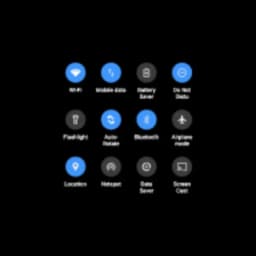
Screenshots
One Shade Hakkında
One Shade, Android bildirim çubuğunuzu tarzınıza ve iş akışınıza uygun kişiselleştirilmiş bir arayüze dönüştürür. Tasarım, renkler, konumlandırma ve erişilebilirlik üzerinde ayrıntılı kontrolle bildirimlerin görünümünü, hissini ve davranışını özelleştirin — cihazınızı root'lamaya gerek kalmadan.
Uygulamanın tam potansiyelini açmak için gerekli izinleri (erişilebilirlik ve bildirimler) vererek başlayın. Buradan dört ana özelleştirme merkezine erişeceksiniz: tasarım kontrolleri, renk paletleri, veri kullanımı izleme ve hareket tabanlı erişim seçenekleri. Bildirim çubuğu sizin tuvaliniz haline gelir.
Bildirimlerinizin nasıl görüneceğini tam olarak kontrol edin. Simge boyutunu tercihinize göre ayarlayın — daha iyi görünürlük için daha büyük veya daha temiz bir görünüm için daha küçük. Üç veya dört sütunlu düzenler arasında geçiş yapın. Bildirim çubuğu arka planına ve metnine özel renkler uygulayın veya iOS'un görsel tarzını taklit eden bulanık ekran efektini etkinleştirin. Her öğe seçimlerinize tepki verir ve telefonunuzu gerçekte nasıl kullandığınıza uyarlanmış bir bildirim deneyimi yaratır.
Bildirim panelinizi alttan, kenarlardan veya belirli ekran kenarlarından açmak için ek erişim hareketleri yapılandırın. Bu hareket bölgelerinin dokunma hassasiyetini ve boyutunu ince ayar yapın. Tercih ederseniz bunları yalnızca ana ekranınızla sınırlayın veya klavye belirdiğinde otomatik olarak devre dışı bırakın. Bu esneklik, bildirim çubuğunuzun sizin için çalışmasını, size karşı değil, sağlar.
Estetiğin ötesinde, One Shade pratik faydalar sunar. Veri kullanımını doğrudan özelleştirilmiş bildirim çubuğunuzdan izleyin. Optimize edilmiş konumlandırma ve boyutlandırma ile sık kullanılan kısayollara daha hızlı erişin. Hangi öğelerin görüneceğini ve nerede yer alacağını belirleyerek görsel karmaşayı azaltın. Bildirim çubuğunuzla her gün birçok kez etkileşimde bulunduğunuz için, bu ince ayarlar gerçek konfor ve verimlilik kazançlarına dönüşür.
Özelleştirme olasılıkları oldukça kapsamlıdır — Android'in varsayılan olarak sunduğundan çok daha ayrıntılı. Kurulumunuzu bir kez yapılandırmak için birkaç dakika ayırın, bildirimlerinizi her kontrol ettiğinizde fayda göreceksiniz. One Shade, cihazınızın en çok görülen öğelerinden biri üzerinde size tam kontrol sağlar.
Android 9 veya üzeri gerektirir.
Artılar ve Eksiler
Artılar
- Granular customization of notification bar without requiring root access
- Monitor data usage directly from your customized notification bar
- Configurable gesture controls to access notifications from multiple screen edges
- Blurred background effect and custom colors mimic iOS aesthetic on Android
Eksiler
- Requires both accessibility and notification permissions for full functionality
- Extensive customization options may require trial-and-error to dial in your preference
- Only compatible with Android 9 and higher, excluding older devices
İlgili Uygulamalar

Microsoft PowerToys
Windows araçları ve üretkenlik yardımcı programları — sistem araçları, pencere yönetimi ve dosya önizleme özellikleriyle iş akışınızı geliştirin.

Windows Essentials 2012
E-posta, mesajlaşma, fotoğraf düzenleme, video oluşturma ve bulut depolama—Windows Essentials 2012, ihtiyacınız olan tüm üretkenlik araçlarını içerir.

Free Download Manager
Aktarımları hızlandıran, dosyaları türe göre düzenleyen ve Firefox ile Chrome ile senkronize olan indirme yöneticisi.

HWiNFO
Windows için donanım izleme—CPU sıcaklığını, GPU yükünü, fan hızını, voltajı gerçek zamanlı takip edin.

TransMac
Windows'ta Mac sürücülerini ve DMG dosyalarını okuyun. APFS/HFS+ depolamaya erişin ve disk imajları oluşturun.

TestDisk & PhotoRec
Kayıp dosyaları kurtarın ve disk bölümlerini onarın — Windows için ücretsiz açık kaynaklı veri kurtarma aracı.
Son makaleler

Ücretsiz çevrimiçi Roma rakamları dönüştürücü: anında, kayıt yok, telefonunuzda çalışır
Oct 6, 2026

Ücretsiz çevrimiçi koşu temposu hesaplayıcısı: split'ler, yarış tahmini ve günlük challenge, indir gerekmez
Oct 6, 2026

Tarayıcınızda ücretsiz Color Ball Sort Puzzle tarzı bir oyun oynayın (indirme gerekli değil)
Oct 6, 2026

Tarayıcınızda ücretsiz Alto's Adventure tarzı bir oyun oynayın (indirme yok)
Oct 6, 2026

Tarayıcınızda Beach Buggy Racing tarzı ücretsiz kart yarışı oynayın (indirme gerekmez)
Oct 6, 2026